Cocoa Switch
CV Archive Photos Also on Micro.blog
  • Monitoring key window in SwiftUI on a Mac

    My Mac app can run in multiple windows and every window can have multiple tabs AKA “window tabs”. We don’t need to do any development work to support tabs in our Mac apps. Sadly I had to disable window tabs in my SwiftUI project because macOS doesn’t tell me when a user switches tabs.

    I use @Environment(\.controlActiveState) to monitor when a user switches between multiple windows. It’s a well-known approach and there are many blog posts describing this technique. The API was added last year in macOS 13. My issues with the tabs are not mentioned in the blog posts I have linked below. The problem is that the value doesn’t update when a user switches from one tab to another.

    I also wish .controlActiveState tells us that a window becomes active or key shortly after the window is created. Luckily, this is easy to workaround by adding my code into task(priority:_:) modifier.

    Related links

    • Detect focused window on macOS
    • SwiftUI and focusedSceneValue on macOS, what am I doing wrong?
    • In macOS how do you detect if my program window is selected or no longer selected on the screen?
    • How to manage WindowGroup in SwiftUI for macOS
    • SwiftUI for Mac 2022

    Tested on macOS 14 AKA Sonoma, using Xcode 15.1. I will keep this post updated if there’s new information coming to my attention.

    Update

    Part 2.

    → 8:01 PM, Dec 17
  • OmniFocus 4

    SwiftUI success story

    One of the articles which caught my attention at the beginning of this year is the Omni Roadmap 2023. Where Omni says that they decided to stick with SwiftUI. Yesterday they shipped OmniFocus 4 on four platforms — Mac, iPhone, iPad and Apple Watch. The major update focused on UI changes and relies on robust data and sync models which were developed earlier. I haven’t used the iPad version, but I installed the Mac version today, and it made version 3 look old and dated. I like the polished iconography, higher contrast colours and refined layout of OmniFocus 4 for Mac. OmniFocus 4 for Mac gained Back/Forward toolbar buttons which previously were available on iOS. Using the Back/Forward buttons is useful and guarantees that I am never lost and can come back to any screen from my navigation history. It took me some time to get used to the iOS version, it got much more stable and reliable in the past couple of weeks, so now I am settled and happy, benefitting from more powerful features on mobile which I will go into later.

    OmniGroup is not the only company which invested in SwiftUI as a new foundation for their products. Here’s a quote from the Photomator developer included in the press release for their App Store Awards success story.

    To start adding Photomator to their portfolio of Mac apps back in 2020, Bastys and his team of engineers decided against porting over their UIKit and AppKit code. Instead, they set out to build Photomator specifically for Mac with SwiftUI. “We had a lot of experience with AppKit,” Bastys says, “but we chose to transition to SwiftUI to align with cutting-edge, future-proof technologies.”

    Interestingly AgileBits went into opposite direction and started to use Electron web technology for their flagship Mac app.

    OmniFocus 4, personal impressions

    I spent a couple of months using the TestFlight version on my iPhone. Thanks to hard work from developers at Omni the mobile app now has tremendous power, it is faster to navigate. There are fewer taps to make because of the bottom tab bar navigation. Quick entry is accessible from any tab. I have to say, I am not a fan of floating buttons because they cover the content behind them, but being able to enter new action from any tab is useful.

    I also discovered that OmniFocus 4 can integrate with Apple Mail when using drag and drop. I made a video to demonstrate the feature. Previously it worked only on a Mac: OF4 drag action into email.mov

    I use OmniFocus on my Mac the most, and I rely on it since version 1. I am quite nostalgic about OmniFcous 1 for Mac, and I was thrilled to be able to change the app icon to its rich original design.

    OmniFocus 1 icon
    → 12:50 AM, Dec 15
  • Small click areas in SwiftUI .contextMenu with List on a Mac

    I am having a problem with SwiftUI on the Mac when sometimes context menus stop appearing when I Control-click (Right-click) space on the left side of the List item. I am talking about small leading padding which is highlighted with a primary colour when an item is selected. It should be always possible Control-click to reveal the context menu when clicking surrounding area but sometimes it stops working until I reinstall my app or some time passes, which tells me it could be a bug in SwiftUI. I use Label for my list items which have icons and text. I have tried multiple approaches and couldn’t find how to solve it yet.

    Related links

    • contextMenu(menuItems:)
    • contextMenu(forSelectionType:menu:primaryAction:)
    • ContextMenu of List stops working when applying custom DisclosureGroupStyle in macOS
    • Context Menus for Tables
    • How to control the tappable area of a view using contentShape()
    • Set a Preview Shape for Views Presenting Context Menus

    Sonoma, Xcode 15.1.

    → 11:52 PM, Dec 9
  • Yesterday I decided to stop maintaining Mastodon accounts for Caffeine++, LinkEdit and Pero. Out of three, only one has followers. I have created single company brand account for current and future projects.

    → 2:01 PM, Dec 3
  • Case for a perfect status bar

    I was not going to write this post until I heard Federico Viticci, Mike Hurley and Stephen Hackett remembering the good old days during the “Roasting Our Past Selves” episode from the Connected podcast. The podcast is great fun, you should subscribe.

    Apple product shots have perfect status bars and a clock set to 9:41.1 Naturally some indie publishers and journalists started to pay attention to this detail. Federico even started to use a Python script for status bar editing. At that time I was inspired to ship a little utility app called Altershot whose entire purpose is redacting status bars.

    I am excited to remember these old days, this subject is important to me because Altershot is my first commercial app idea, I designed it for people like Federico. When I tweeted the link to the app, Federico replied with something like “I need this in my life!”. It made my day.

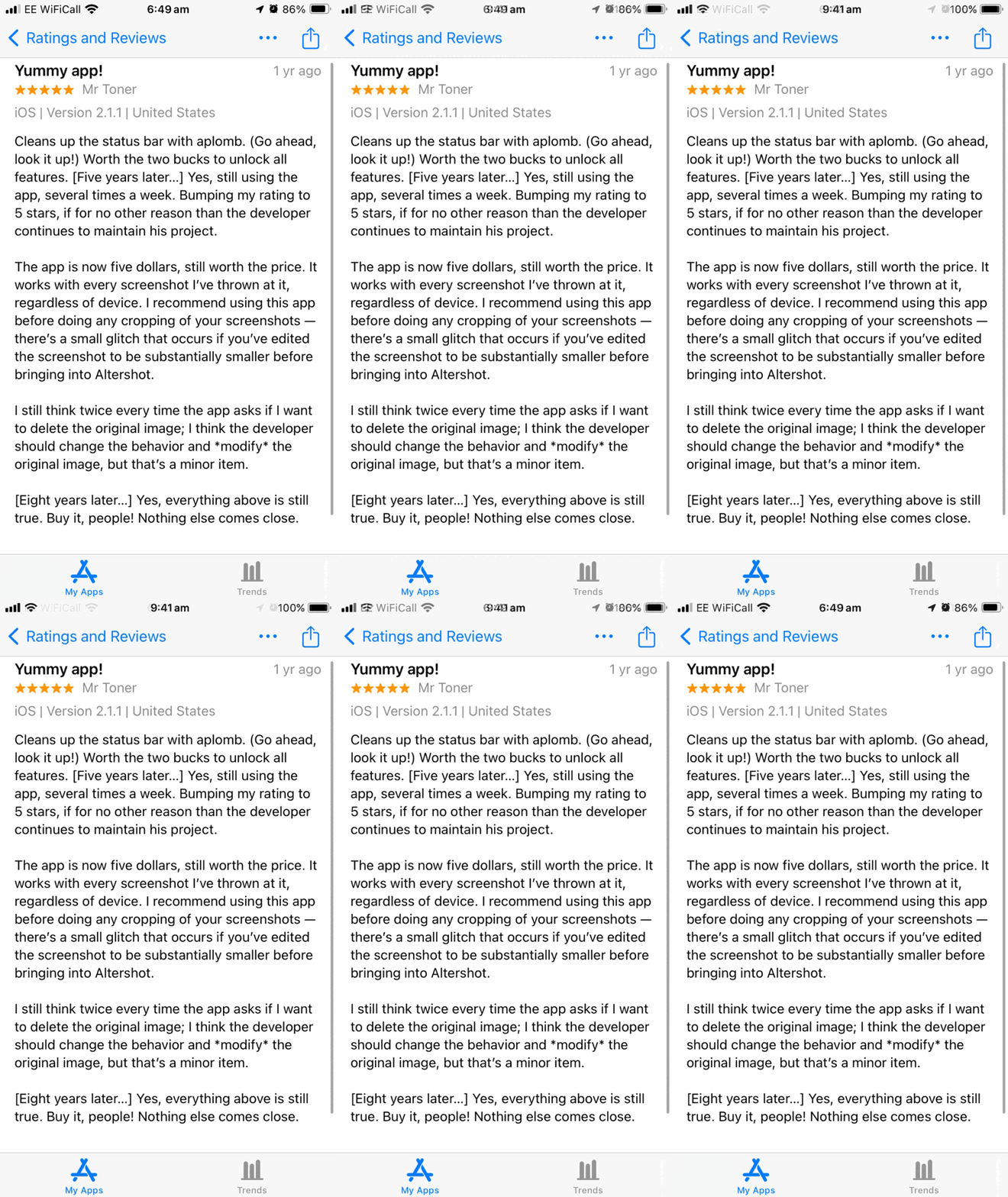
    I am still maintaining the app. Recently I shipped version 2.2 which introduced non-destructive photo editing, at least one person was waiting eight years for this feature. Thank you for your patience, Mr Toner.

    app store review, title - yummy app, 5 stars

    1. This is why it’s always 9:41 in Apple product photos ↩︎

    → 8:01 PM, Nov 25
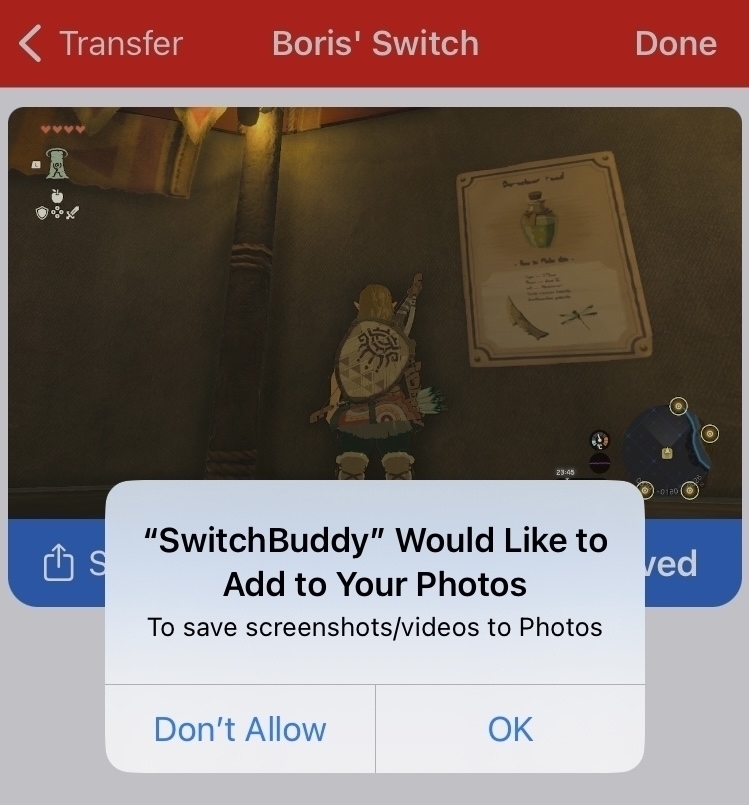
  • I am trying a new app which in addition to its digital price tracking, offers better UX for NS screenshot transfers. Check out SwitchBuddy.

    SwitchBuddy with Zelda Tears of the Kingdom screenshot. Dialog offering adding the image into photos library
    → 9:40 PM, Nov 23
  • Our Apple Watch journey

    2023 is the biggest year for Apple Watch since its introduction. We have shipped a brand new wearable-first password manager. We started the project in late July. It’s the most popular public testing we had so far.1

    I am finding new usages for Pero I didn’t expect I need. Last week I applied for a library card for my daughter and at the counter they asked me to provide a pin. Using a phone would be more socially awkward. Apple Watch worked well in this situation, I still had to break eye contact, but not long enough for the library person to lose their patience. They were waiting and the speed of opening Pero and creating new passwords was critical.2 Jennifer Patton, watchOS designer from Apple, defined experiences like mine as “Apple Watch Moment”, a very brief, no longer than 10 seconds, opportunities in which we can benefit from performing computational tasks.

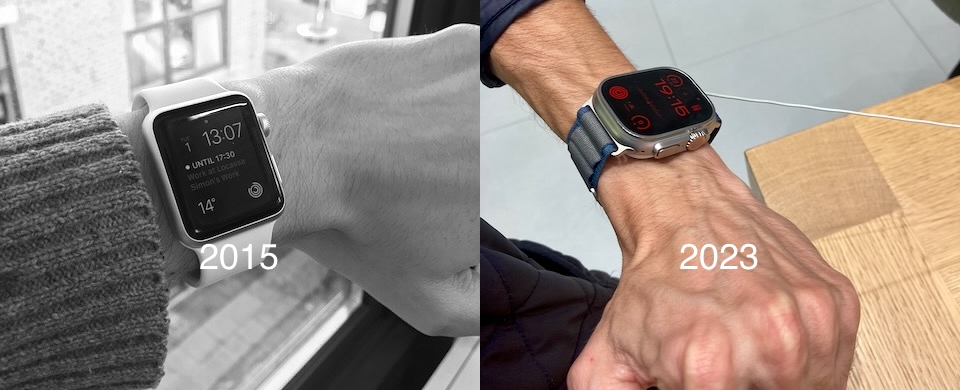
    Me and my partner have been using Apple Watch since its introduction.3 We upgraded to Series 7 and still use them. This fall I have tried the Ultra, and I liked it even more than Series 7. I never thought I would like a big watch, but trying it on changed my mind. It’s freaking cool to have a computer on your wrist, I do feel like a superhero when I use it.

    On the left Apple Watch 1st gen, on the right Apple Watch Ultra 2

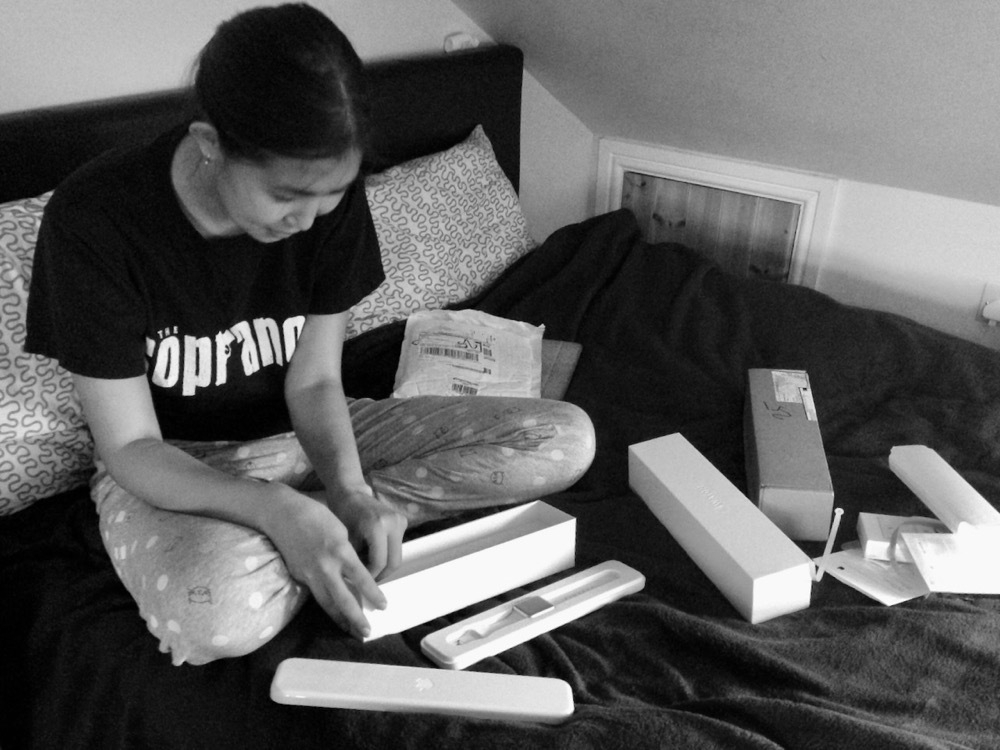
    I wanted to share a good memory of us unboxing our 1st generation models.

    My wife unboxing Apple Watch

    1. I won’t share numbers, but they are in double digits. ↩︎

    2. After finishing my conversation in the library I stepped away to assign a title for the newly created entry. Because Pero uses SwiftUI it persists in its UI state, so I was able to continue where I left off even after the app was put into the background. ↩︎

    3. My Series 0 developed an inflated battery case. An Apple Store employee replaced it with Series 1, even though it’s been out of the warranty window. Series 1 lasted me until Series 7. ↩︎

    → 7:22 AM, Nov 16
  • Pero's origin story

    I have been frustrated with 1Password for Apple Watch. The app has a launch delay, and sometimes it won’t load at all, showing an empty screen. Our household was paying a $59.85 subscription for 5 years.1 This means we invested around $300 in subscription costs. I find it unacceptable. Naturally, I found a solution by building a brand new password manager.

    When we worked on Pero, we had only one goal — to make the interface as fast as possible while delivering a powerful and useful tool. It especially pays off when working on the Apple Watch canvas. Quick interactions are paramount when building a successful Apple Watch app. However, we didn’t want to sacrifice utility. Many Apple Watch apps on the App Store are just baby apps, and they lack functionality. Pero is different. It is Wearable-First on day one. Meaning, you get all the core functionality right on your wrist. It’s not just for looking up passwords, you can generate new passwords, change them, use tags for organisation, and even assign custom icons.

    We are proud to announce that Pero will never require an ongoing subscription for its core functionality. We have a great vision for this project, but it can’t be achieved without your feedback. Join us in our fight against subscription-only racket. Install Pero today.2


    1. I have been a 1Password user since 2010 before Agile Bits switched to a subscription-only model. With a heavy heart, I see projects from respected Mac companies corrupted by focusing on B2B and rushing wrong technical decisions. ↩︎

    2. Apple Watch Series 4 or newer required. watchOS 10 required. ↩︎

    → 6:57 AM, Nov 8
  • Issues with Battle.net 2FA

    I remember picking up a DVD copy of World of Warcraft. They had me on “Macintosh” written on the side.
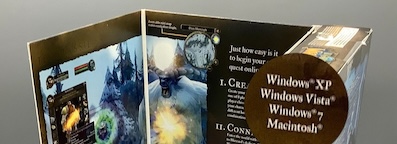
    Wow original box mac tiny

    Recently I picked up a Diablo IV copy. Me and my partner finished Diablo III in couch co-op on the Switch. I wanted to experience what Blizzard has to offer running on a powerful PS5. I have also purchased a second PS5 controller just for this occasion. I am glad to report that we are pleased with the game so far, and I recommend it. It is even more fun than the previous version, much darker and mature. The game is approachable with a low learning curve. The user interface is beautifully crafted and gameplay works great with a controller. But there are issues, and I have concerns, deep concerns about everything which surrounds the core game. Compared with the Switch version, one can say that the human experience setting up the game went into actual hell. The actual demons I needed to fight were 2FA error messages and constant loading spinners.

    I was wise to put the disk in early so it could be copied to our PS5 while we were putting the kids to sleep. The process of copying of course has not finished because PS5 fell asleep, and I had to restart it. We watched a TV show listening to PS5’s rocket-ship-about-to-take-off noise.

    Good start. I opened the game and the first thing it asked me was to log into Battle.net. I do have an account, of course. The devs made it convenient allowing me to scan QR code using my iPhone’s camera. Then I was presented with a login screen and signing-in issue as the 2FA code from Blizzard’s proprietary iOS app didn’t work. I could sign in. Soon I learned that their property app is retired and instead, functionality is shown in Blizzard’s Battler.net. Me 20 minutes trying to figure out how to migrate didn’t work, and I realised that I couldn’t do it without submitting a ticket. I sent my ticket on the 28th of October and received a reply the next day. With apologies for the slow reply, I was asked to answer 12 vague security questions. I think 1 day is pretty fast, okay. I replied on the 31st of October, it took me 20 minutes to collect all the information I could find. I was able to ask some of them, including my previous address (I don’t know which, I have 7 of them), PayPal transaction ID from my bank, security question (thanks 1Password), and my previous phone number. It’s been 10 business days, I still have not received any reply. Okay, I don’t care about the account, I would like to get it back eventually, but we really wanted to play, so we just created a new account.

    On that cold night, I logged in with my wife’s account just to test it out. Sony linked my wife’s account with my PSN, and now I would have to wait a year to unlink them, okay? I created a new account for my partner on Battle.net. Then I realised that my wife also needed a PSN account just to be able to play locally, so we created a new account for her as well. By the time the game was loaded and we both “logged in”, it was almost 2 AM, we played for 10 minutes and then went to bed. Next week we played again, I am not going to do any work on the setup until we finish the main campaign. If it’s not broken, don’t fix it.

    What can be improved

    1. Sony, please adopt Nintendo’s “PLAY MODE” physical box design for demonstrating how your game can be played right on the box, so we don’t have to do research just to know how the game can be played.
    2. Blizzard (now Microsoft), however, is responsible for not using open standards for 2FA, why they are still in charge, and why this kind of decision was made. It costs in customer support and development, it’s idiotic tech leadership.
    3. Sony, please learn from Nintendo how to do couch co-op. There was zero setup on Nintendo Switch, it just worked. Why Sony and Blizzard (now acquired by Microsoft) think it is okay to steal ~2 hours of our lives just so 2 of us can start the game is beyond me.

    Image credits LeHeathersBoutique, sourced from Etsy.

    → 8:10 PM, Nov 7
  • Executing on "move fast" approach

    Pero’s development took a relatively short time. Starting a brand new app is a big task, and there’s a risk when the scope of the project grows uncontrollably. This didn’t happen to Pero because we focussed on delivering true MVP. We started with a single platform and iterated until we were happy with the final results. Now we have a brand new password manager. It is shippable and has a good potential for growth.

    Now we need to go even higher, and we depend on your feedback, dear readers. Install Pero1 and let us know what you think.


    1. Apple Watch Series 4 or newer required. watchOS 10 required. ↩︎

    → 6:53 PM, Nov 7
← Newer Posts Page 20 of 37 Older Posts →
  • RSS
  • JSON Feed