Cocoa Switch
CV Archive Photos Also on Micro.blog
  • Staff owned companies

    Worker-owned businesses are relatively new practice. For example, most podcasts and podcast networks are owned by their hosts, and that’s a great thing. As well as indy software publishing houses. I think it works great in this new digital job field where the company size is small.

    Interestingly, my beloved John Lewis and Waitrose are also a co-op. The company became successful in the traditional capitalist model and then transitioned into the co-op. The company is in trouble now, and the co-op nature is likely the negative factor.

    And yet very few worker-owned companies have succeeded in the long term. We saw that with the experiments in industrial democracy in this country in the 1970s, when the likes of the Meriden motorcycle co-operative were backed with government money and state-supported soft loans, but still eventually collapsed.

    We have seen it with the repeated turmoil at the Co-op retail empire (the Co-op is owned by its customers and local societies rather than the staff, but the principle is much the same).

    And we have seen it in the failure of countless similar initiatives in most major developed economies. The only really successful worker’s co-op in the world is the Spanish industrial conglomerate Mondragon, but even that has had its fair share of challenges to cope with.

    None of the world’s major companies are owned by the workers.

    These businesses are very resistant to change. The staff are inevitably very conservative about their own roles and working practices. They don’t want to have to learn new skills and they definitely don’t ever want to be made redundant.
    → 7:29 AM, Apr 19
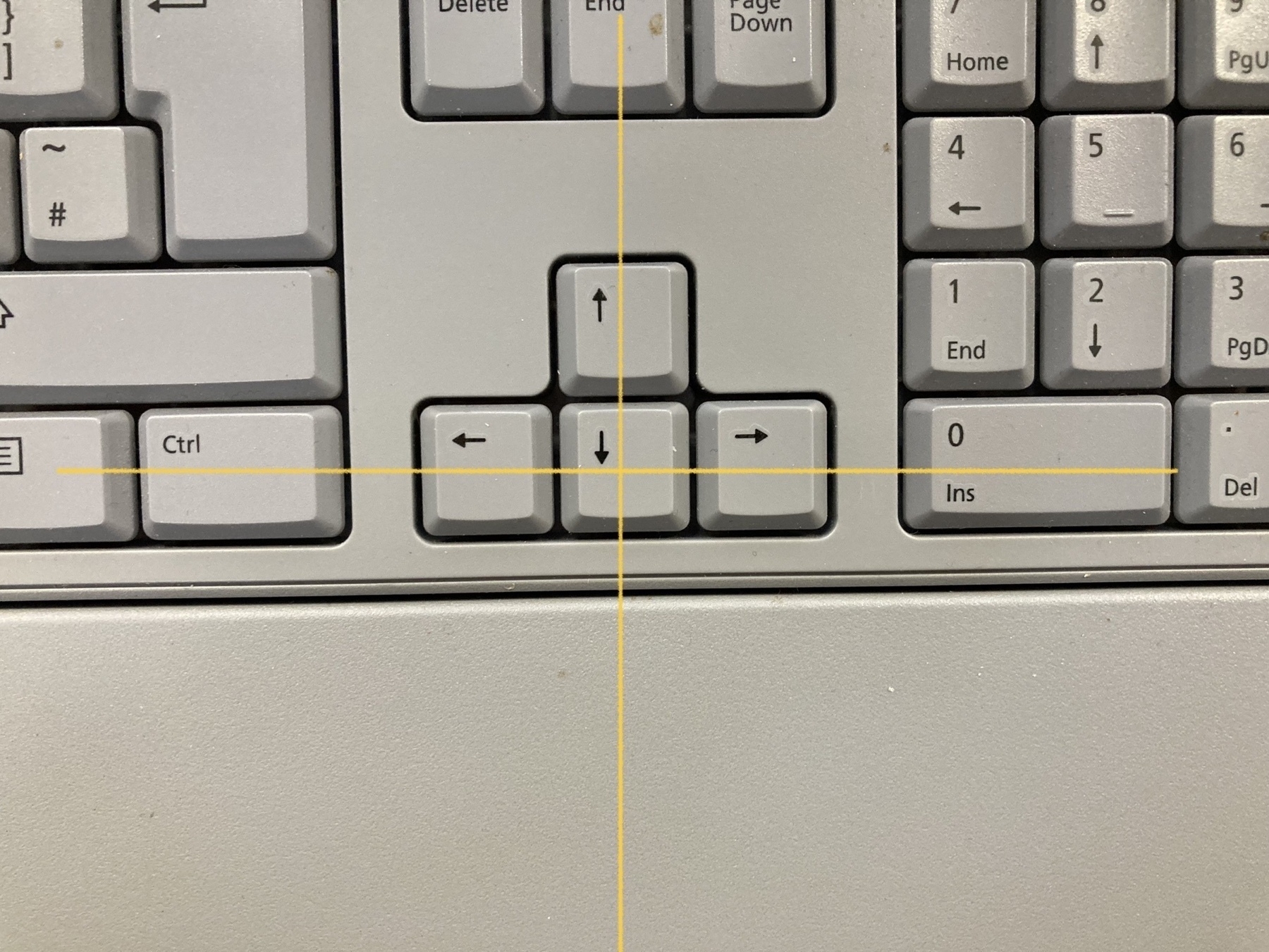
  • Is this a norm on all PC keyboards? The arrows are not aligned.

    → 11:46 AM, Apr 18
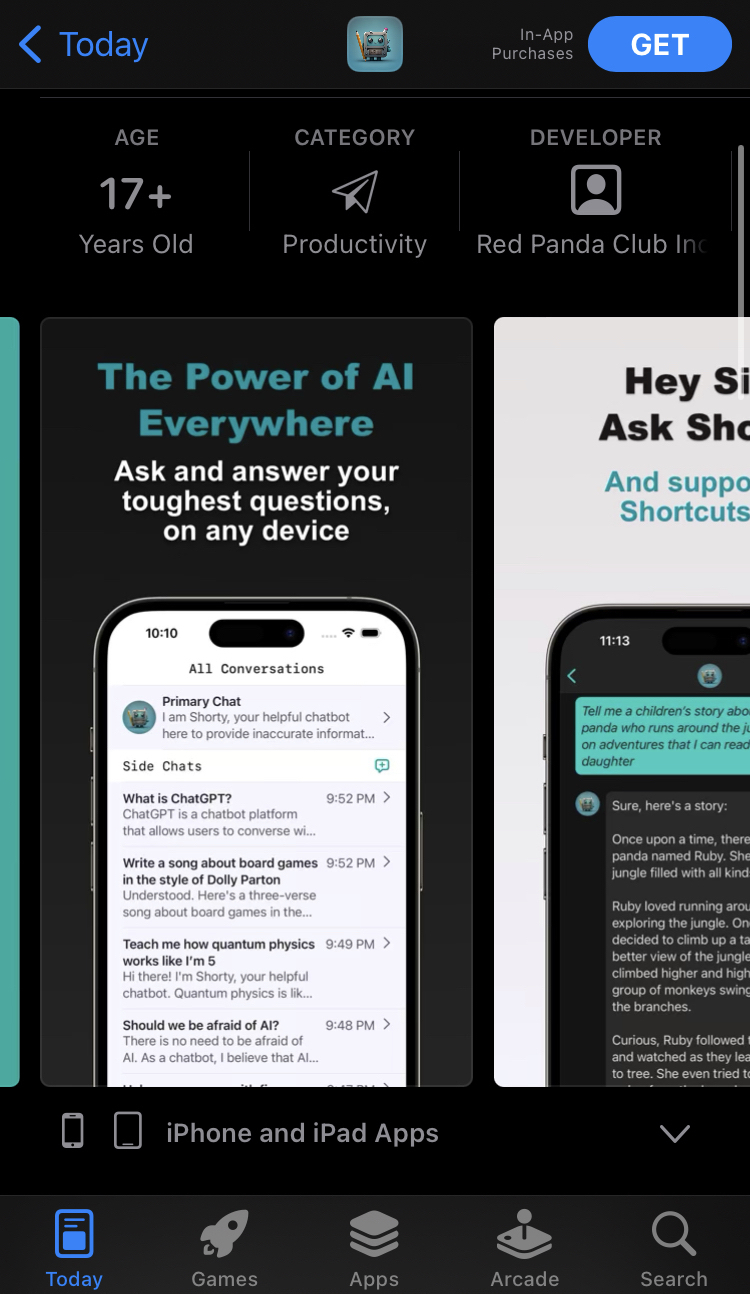
  • Another example – Short Circuit page. The bottom of the app is hidden on all App Store screenshots.

    → 9:40 PM, Apr 17
  • What makes Waitrose different

    Waitrose is my favourite places to shop. Just after we moved into the UK, their shop in Oxford stood different to other shops. This picture I took this from my local Waitrose in Wimbledon. It’s still my favourite place to buy groceries.

    Waitrose entrance showing green shelves and lack of people shopping

    I like to spend time there and enjoy good typography and design, friendly relaxed staff, great quality, free coffee and magazines. One of the things I love about the place is the lack of cheap toys which are strategically placed to grab kids’ attention. Waitrose has more profitable margins than Lidl so they can afford to focus on long-term profitability, instead compensating with shady schemes like temporary sales which create a fake sense of urgency, rotating stocks of overpriced low-quality toys and irrelevant goods, specifically placed to waste your time. Did I mention £1 egg machines and candy dispensers? Waitrose still doesn’t have these, and that’s why I prefer shopping there, especially with kids. Their shop has a great design, toilets are placed at a comfortable distance, for example. It’s never overcrowded, there are never long queues, and the staff is friendly and helpful. They also have by far the best-tasting bakery, sushi and dinner kits. Almond croissants are legendary.

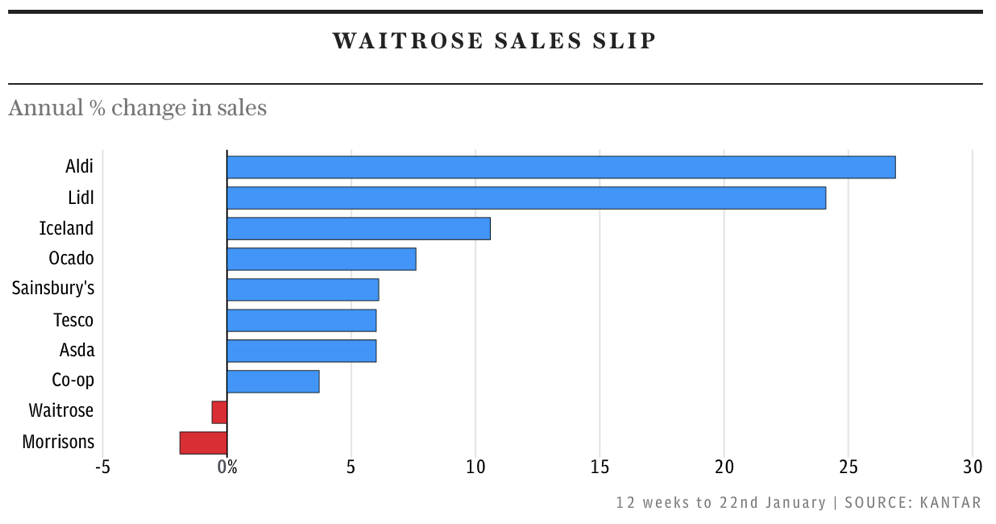
    There are some cracks in the facade showing. I am glad to see the coffee is back, but I couldn’t notice the appearance of kids’ magazines with cheap toys attached to them. And it’s a big warning sign. Looking at this chart from the Telegraph, Waitrose is not doing well financially as well, and it makes me sad.

    Waitrose sales slip shows negative number while Aldi and Lidl is leading with 25%-30% advantage

    I also shop at other supermarkets. I don’t go to Waitrose because of the cheap prices, for that there’s Lidl. The current marketing push on the essentials is not a winning strategy for Waitrose. They need to embrace what made them different in the first place and try to stay different. I will be rooting for them.

    → 12:56 AM, Apr 11
  • It’s a poor choice to include device bezels in App Store screenshots. Why would you shrink your interface? Looks especially awful on the Mac App Store. For me, it’s one of the indicators of what developers I trust.

    → 12:26 PM, Apr 9
  • I have finally found that iCloud tabs are now live in the new tab interface. I think it’s a little bit less intuitive, but I’m just happy it still exists.

    → 7:04 PM, Apr 8
  • Safari 16.4 improved typography

    Safari 16.4 update is big. WebKit team is killing it. Read the blog post summarising new features and fixes. I respect how performance and battery life are priority number one. I also like that Safari is leading industry in typography and layout. I used to work as a web developer and working with CSS and HTML is something I am enjoying doing, I am especially interested in new CSS tags.

    My favourite new feature is font-size-adjust, I already added this to this blog, so if you run the new version of Safari you can benefit from improved typography. Here’s the before and after. So far Safari is the first browser to support this tag.

    Text with a mix of 2 fonts, before and after, with the after having proportional sizes
    → 11:19 AM, Apr 7
  • Working with file system on macOS. Part 2

    Since my last post I kept tinkering with file system APIs.

    Download full project

    You can access the sample project on GitHub.

    Learning materials and examples

    Most of my questions are about the use of NSDocument, how to read it and how to write text files. Supporting desktop-class features in your iPad app is an excellent help and contained almost everything I need. There’s another example project which uses NSDocument: Developing a Document-Based App. For those who need to work with UIKit in addition to AppKit, I will repeat, the OSDocument approach from Nick Lockwood. There’s entire open source iPad code editor which I have found helpful as well/

    I can read the content of any text files without using FileManager, by overriding NSDocument methods and storing text in the document.

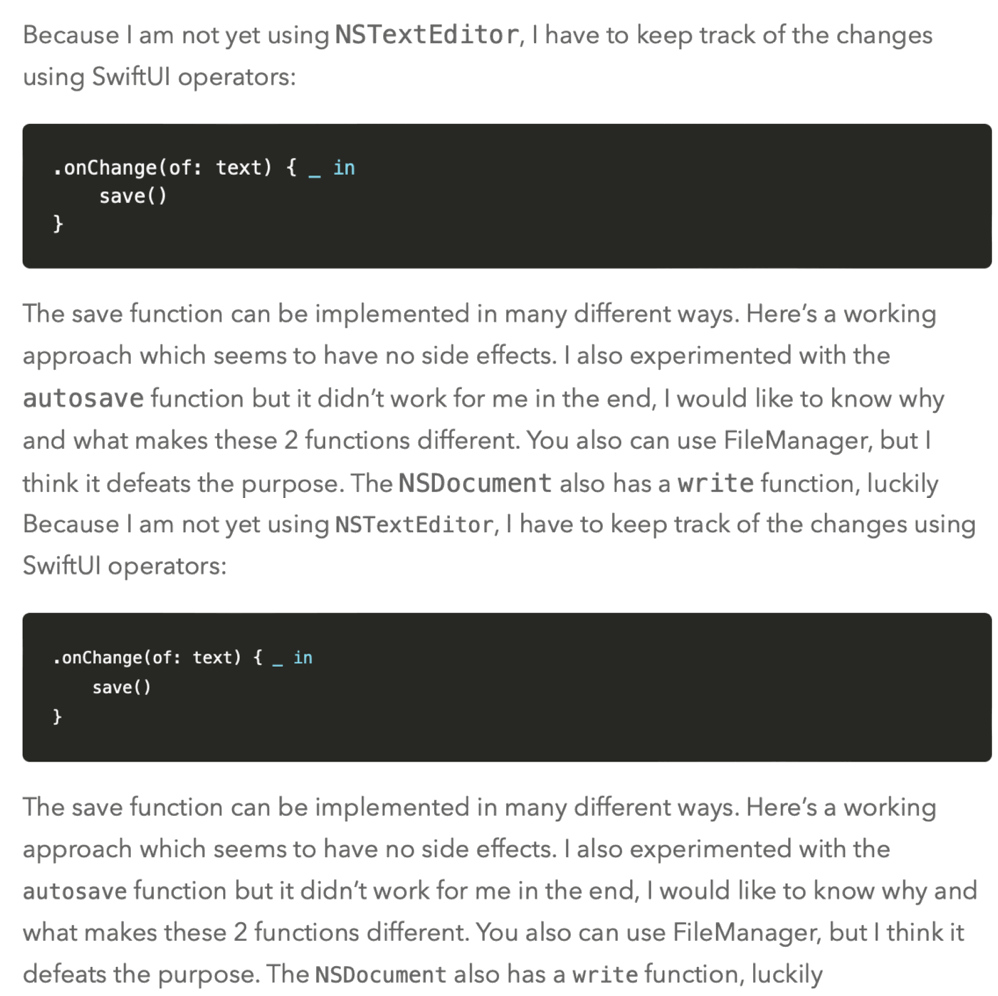
    Because I am not yet using NSTextEditor, I have to keep track of the changes using SwiftUI operators:

    .onChange(of: text) { _ in
        save()
    }
    

    The save function can be implemented in many different ways. Here’s a working approach which seems to have no side effects. I also experimented with the autosave function but it didn’t work for me in the end, I would like to know why and what makes these 2 functions different. You also can use FileManager, but I think it defeats the purpose. The NSDocument also has a write function, luckily documentation says that it’s meant to be overridden and not called. Only the save function updates the file’s modification date properly, which allows OS to track changes.

    file.updateChangeCount(.done)
    file.save(self)
    

    External changes

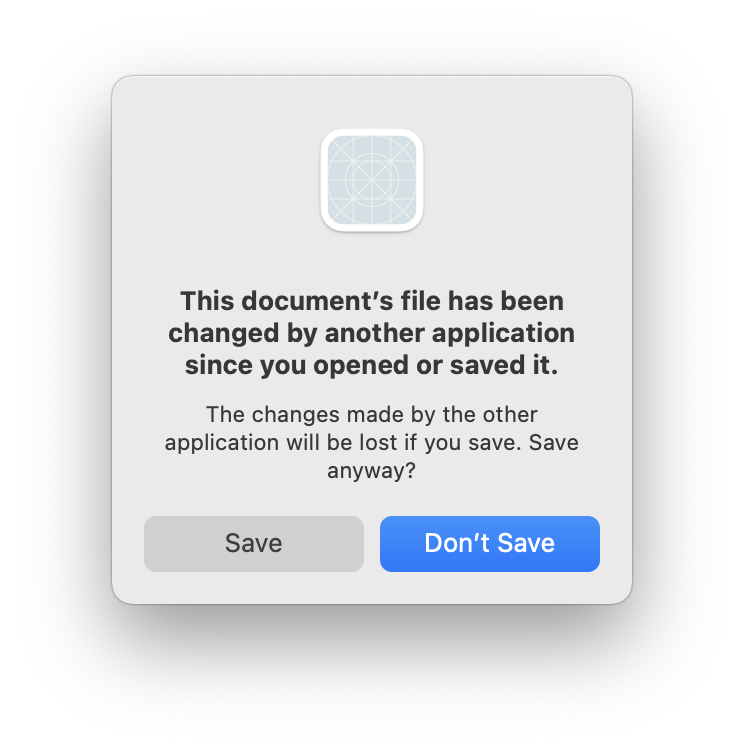
    It is necessary to know about file content updates, likely, from a user using another text editor. NSDocument can detect when a file was modified externally and show the native dialogue.

    Alert This document's file has been changed by another application since you opened or saved it Save or Don't Save

    There’s also a different version of this dialogue with “Revert” and “Save As…” options. In my sample application only the “Save Anyway” button works. Reverting does nothing, and “Save As” causes a hang. I suspect it is somehow related to the autosave.

    DispatchSource issue

    My sample project uses DispatchSource to watch changes made in the root folder and changes made in the file itself. It works well for me when a name can change or when a file is deleted. However, monitoring content changes is not that reliable. Unlike the FileWatcher library, it stops working after some time, and the only fix is to select the root folder in the open dialogue and save a new secure bookmark.

    The save dialogue allows me to ignore content changes and let the user override changes which were made externally with the “Save” button.

    Permission issues

    I had this one issue which caused writing errors.

    Error Domain=NSCocoaErrorDomain Code=513 "You don’t have permission to save the file “markdown” in the folder “new”." UserInfo={NSFilePath=/Users/boris/Pictures/new/markdown.md, NSUnderlyingError=0x60000031d950 {Error Domain=NSPOSIXErrorDomain Code=1 "Operation not permitted"}}

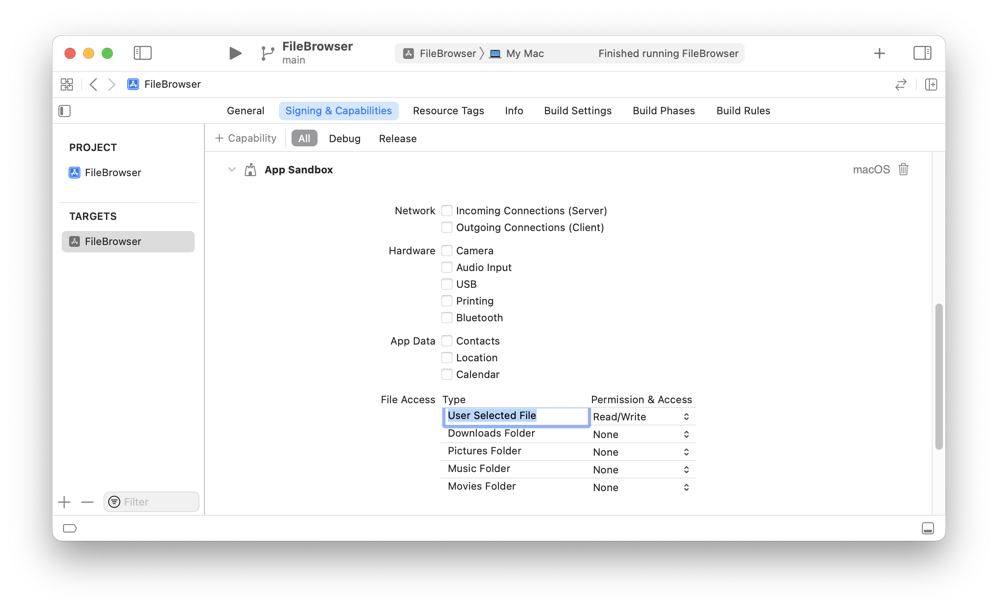
    After trying various things, I have found the root cause in the Signing & Capabilities project settings. All I needed to change is to set the User Selected File to “Read/Write” instead of “Read”.

    Xcode target preferences File Access User Selected File Read/Write

    Update

    Part 3.

    → 7:49 PM, Apr 6
  • The Quarry

    Just finised playing The Quarry last night. It’s the best couch co-op you can play with another adult. We had lots of fun and achieved multiple endings. It’s hard to keep everyone alive but the game is friendly to non-gamers and teaches you everything you have to do as part of the story. I love how almost real facial expressions look like in this game, the difference is almost as big as Half-Life 2 and everything that came before. I am not up to date with the most recent games and only starting to appreciate these developments now. The game is made by Supermassive Games studio based in the UK.

    → 12:05 PM, Mar 26
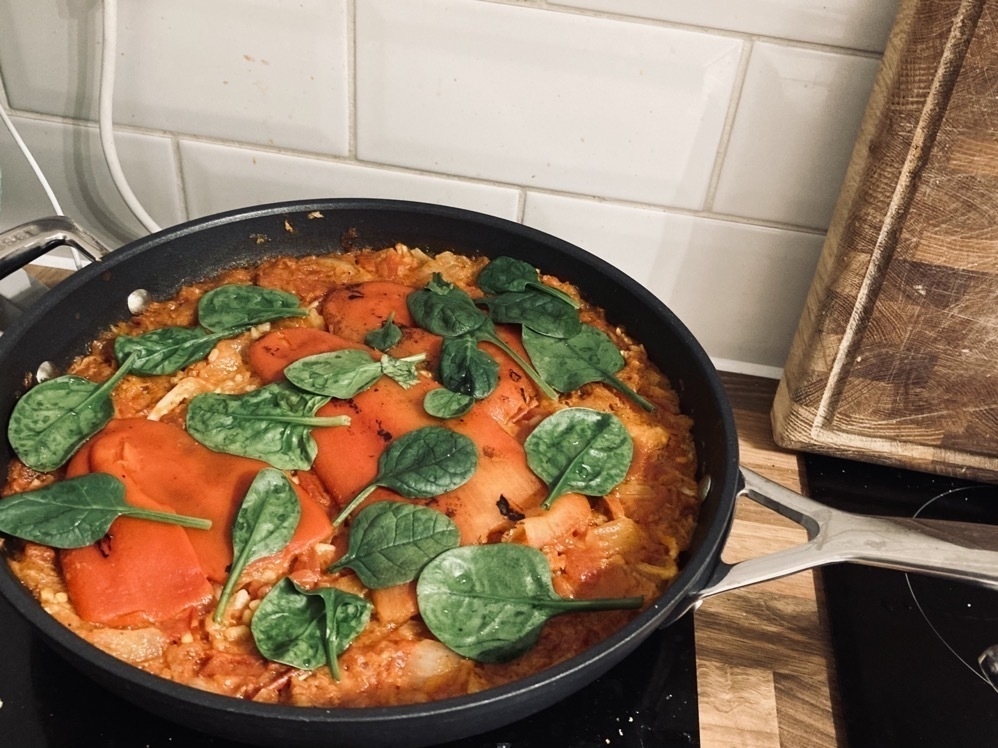
  • Chorizo and spinach paella

    Good inexpensive and filling dish, easy to cook and very tasty. You can add prawn or seafood if you fancy but it is great with just chorizo, and you need just a little bit. I have found it on Tesco’s website and cooked it twice already. The ingredients were easy to find in any shop in the UK, in my case it was Morrisons.

    Cooking chorizon Paella topped with spinach

    Download the PDF as a backup in case page goes down.

    → 8:06 PM, Mar 25
← Newer Posts Page 26 of 37 Older Posts →
  • RSS
  • JSON Feed