Cocoa Switch
CV Archive Photos Also on Micro.blog
  • Does my app use encryption?

    A note for myself as I keep researching this topic every couple of years. If your app uses CloudKit encryption, it does not count as something you need to declare in the App Store Connect.

    Your app uses encryption limited to that within the Apple operating system

    No documentation is required in App Store Connect.

    – Apple
    – Stack Overflow confirmation

    App Store Connect questions

    Does your app implement any encryption algorithms that are proprietary or not accepted as standards by international standard bodies (IEEE, IETF, ITU, etc.)?

    Does your app implement any standard encryption algorithms instead of, or in addition to, using or accessing the encryption within Apple’s operating system?

    You can avoid all these questions by modifying the Info.plist file.

    <key>ITSAppUsesNonExemptEncryption</key>
    <false/>
    

    As my current understanding, the false value means you answering no to both questions.

    HTTPS

    From Stack Overflow, the US government changed the law and eased rules on mobile apps which use HTTPS. If your app uses HTTPS, you still should answer no to the both questions.
    → 7:55 PM, Aug 24
  • The Independence Day of Ukraine

    Address by Volodymyr Zelenskyy on the Independence Day of Ukraine via president of Ukraine website, and YouTube.

    In yesterday’s episode of Ukraine: The Latest podcast, from New Zealand correspondent, there’s a conversation between Russian civilian and Ukrainian soldier sheltering in a bunker in Sudzha, Kursk region in Russia. Ukrainian asks Russian their opinion about the war. Russian says he is not interested in politics—a common response.

    We have to care about politics because it makes a difference. Steve Jobs understood how important individual actions followed by great public reactions caused big positive societal changes. It was reflected in the Think Different campaign. Ignorance leads to tyranny and abuse, individual opinions matter. Every day we have opportunities that affect the views of people around us.

    → 11:12 AM, Aug 24
  • Safari is still underdog, iTunes Store is still underdog, macOS 8 times smaller than Windows, iMessage is only used in the USA at all. There’s room to growth. Did I mention how few people use Pages over Word, Preview over Acrobat, Figma over Sketch. And you people worry about DMA.

    → 9:37 PM, Aug 22
  • Now rewatching Alien and enjoyed many references to the original. If you want to appreciate all of them, watch the original before you watch Romulus. The film felt emotionally real and the crew acted like real people.

    → 8:12 AM, Aug 20
  • iCloud Backup and Apple Watch apps

    When I upgraded my iPhone I went through a mostly-automated process pairing my Apple Watch to the new iPhone. It includes the watch backing up, erasing itself and then restoring from the backup. My app Pinbook stores files only on Apple Watch. After the restore process had finished, I opened Pinbook and realised that all my files were gone.

    Apple support article:

    Here’s what your Apple Watch backup includes

    App-specific data (for built-in apps) and settings (for built-in and third-party apps).

    In conclusion, Apple Watch iCloud Backup does not include app-specific data for third-party apps. For Pinbook, I need to figure out a way to backup data to iPhone or, better, use CloudKit sync.

    → 9:48 AM, Aug 17
  • AppIntents runtime error

    When debugging the Smart Stack widget and running my Apple Watch project in Xcode 10.4 I started to see AppIntents.PerformIntentError.intentNotFound error. I’ve found that there’s at least one person with a solution on Apple Developer forum.

    Quick fix

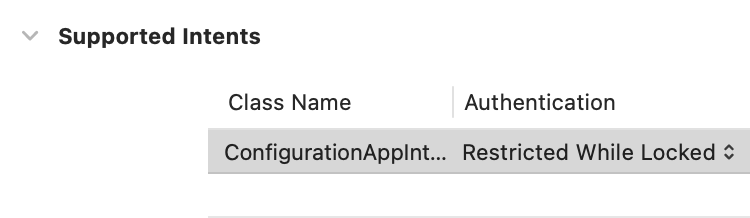
    The forum solution requires changing the iPhone app target configuration.

    Xcode iPhone target preferences

    This change generates an AppName-Info.plist file with the following content.

    <?xml version="1.0" encoding="UTF-8"?>
    <!DOCTYPE plist PUBLIC "-//Apple//DTD PLIST 1.0//EN" "http://www.apple.com/DTDs/PropertyList-1.0.dtd">
    <plist version="1.0">
    <dict>
    	<key>INIntentsRestrictedWhileLocked</key>
    	<array>
    		<string>ConfigurationAppIntent</string>
    	</array>
    	<key>INIntentsSupported</key>
    	<array>
    		<string>ConfigurationAppIntent</string>
    	</array>
    </dict>
    </plist>
    

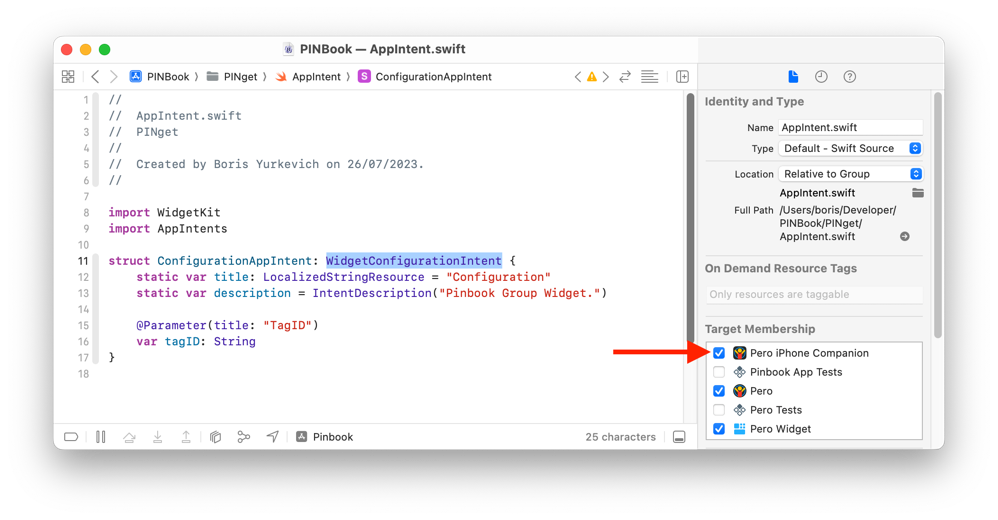
    I also needed to check the intent Swift file under the iPhone app target, otherwise, it won’t build or crash during launch (I don’t remember exactly).

    Swift file checked out under main iPhone target

    Better solution

    Before trying to fix the problem, I asked myself a question, why this custom configuration was in the project in the first place, and is it needed? I know that these preferences can affect the iOS widget and have no effect in the Smart Stack behaviour. The way watchOS works is when a watch is locked, the Smart Stack is not available. It’s not possible to interact with the Smart Stack when the Apple Watch is locked. The preference I had under both targets can and should be removed. Since the preference was the only entry on the plist file. I could delete the entire file. Supported Intents sections are empty in every target. In conclusion, I have one less Info.plist file in the project and fewer configurations associated with the project.

    Real application

    This post is dedicated to my Apple Watch password manager — Pero, soon to be renamed to Pinbook.

    → 5:31 PM, Aug 16
  • Working with file system on macOS. Part 3

    Finally, I have came around to shipping a solution for monitoring file system events using higher-level API. The main advantage is potentially to be able to ship to iOS and other Apple platforms. I couldn’t do it myself without the help from mighty the internet.

    Well-documented example code for writing a wrapper around DispatchSource for monitoring changes in a single file → https://swiftrocks.com/dispatchsource-detecting-changes-in-files-and-folders-in-swift

    A nice article which describes how to cancel DispatchSource connection → https://agostini.tech/2017/08/06/monitoring-files-using-dispatch-sources/

    Sample Swift code from Apple Engineer https://forums.developer.apple.com/forums/thread/90531 demonstrating how to monitor changes in a directory. It also features a debounce pattern which can help with performance.

    Implementation problems

    I made changes to LinkEdit to allow the creating new NSDocument subclasses, my initial implementation caused these 2 warnings.

    Trying to save a document without any appropriate writable type defined.

    And the second one.

    The app did not specify supported document types in its Info.plist. This is discouraged.

    These two warnings were fixed with the following code in my NSDocument subclass.

    override class var writableTypes: [String] {
        return ["net.daringfireball.markdown"]
    }
    

    Useful links

    • Useful article Markdown Playgrounds: Setting Up a Document-Based App
    • Good introduction to DispatchSource from agostini.tech.

    Real application

    This post wouldn’t be possible without the work which went into LinkEdit. It describes one of the many features and improvements included in recent 1.3 major update.

    Previously

    Part 1, and Part 2.

    → 4:24 PM, Aug 13
  • Make Something Wonderful

    Finished reading: Make Something Wonderful, Steve Jobs in his own words by Steve Jobs 📚

    “Don’t be a career. The enemy of most dreams and intuitions, and one of the most dangerous and stifling concepts ever invented by humans, is the “Career.” A career is a concept for how one is supposed to progress through stages during the training for and practicing of your working life.

    There are some big problems here. First and foremost is the notion that your work is different and separate from the rest of your life. If you are passionate about your life and your work, this can’t be so. They will become more or less one. This is a much better way to live one’s life.”

    A holiday is finishing, and I found some time to work on this blog and continue to work on a personal project. My family tends to wake up late, I can wake up a bit earlier, and that’s a one-two hour period I could spend on my laptop every morning. I only regret realising it towards the second half of the holiday and not doing it every day.

    At the same time I’ve been finishing reading the book and that’s where I discovered the quote. I now understand what Steve meant. There’s no healthy work-life balance for some of us. True meaningful creative work requires you to dedicate your entire life. When my family doesn’t need me, it is my time. The time I owe to myself. There can be no rest or holidays, there can be no stopping. Now I know it’s not just me. I don’t need to change. Because days when I did nothing for myself, I felt a little depressed, sometimes even angry. Because I knew I missed a day where I could advance a little, I missed a little opportunity to make some progress. Every day counts.

    → 4:11 PM, Aug 13
  • Was watching California Sea Lions with my family. They used the same music which I remember from a video of the original Macintosh introduction.

    Coincidence?

    → 12:37 PM, Aug 11
  • Monitoring key window in SwiftUI on a Mac, part 2

    I had difficulties making menu bar commands respond to a user interface state when an app running in multiple windows or tabs. In short, I have used .controlActiveState environment with some workarounds. More details in the previous post. The workaround is not useful when I tested my application with multiple window tabs running. I even had to disable the window tabs altogether. I am happy to share that I found a solution which works with windows and tabs.

    You might think that there’s a new beta API introduced with macOS 14.6. Actually, it took me some time to figure out and implement a solution which works on macOS 14.5 and even on 14.4.

    The solution which I found in the Hacking With Swift blog post works with adding an ObservableObject class and using .focusedSceneObject SwiftUI view modifier.

    Defining state:

    final class EditorState: ObservableObject {
        @Published var editorMode: EditorMode = .editor
    }
    

    Magic SwiftUI glue.

    .focusedSceneObject(editorState)
    

    Accessing state:

    @FocusedObject var editorState: EditorState?
    

    Helpful links

    • Doc-App global state with focusedSceneObject solves MacOS dynamic Menu issues
    • Provide the current document to menu commands in a SwiftUI app
    • FocusedValue and FocusedBinding property wrappers in SwiftUI
    • How to use @FocusState with view models?
    • Mastering FocusState property wrapper in SwiftUI
    • Craig Hockenberry’s question about custom views and focus state.
    • Window management in SwiftUI

    Real application

    This post wouldn’t be possible without the work which went into LinkEdit. It describes one of the many features and improvements included in recent 1.3 major update.

    → 7:41 AM, Aug 11
← Newer Posts Page 14 of 37 Older Posts →
  • RSS
  • JSON Feed