Cocoa Switch
CV Archive Photos Also on Micro.blog
  • Falling in love with my camera again

    I have upgraded to an iPhone 16 Pro. I wouldn’t say I like the trend of increasingly aggressive HDR, and noise reduction. Latter leads to hiding imperfections in human faces, almost like a beauty filter. I have owned a digital camera since I was a kid. I have pictures in my photos library that are shot on film, then my Sony DCR-TRV60E video camera, and lastly, Konica Minolta DiMAGE Z20. After that, I switched to an iPhone. Mostly for convenience. I like shooting on iPhone, but since I started to use SE 2, it didn’t feel as fun as before. Pictures I have from iPhone SE 2, and later iPhone 13 mini look a little bit too perfect and evenly shadowed. The colours are a bit too vibrant and unreal. Rich Contrast setting did make things a bit better and I regret not always using it.

    I was nervous about pre-ordering the iPhone 16 Pro without knowing anything about the camera. On Thursday I sadly learned that the flagship smartphone introduced even more processing than ever, taking a crown from 15 Pro. But there’s good news, as well. Verge has written that the next generation of Photographic Styles can help reduce the processing. I use Neutral at this moment and it’s kind of similar to the Rich Contrast mode. It makes things better to my eye, pictures have more contrast and skin looks more interesting—closer to real life.

    Everything changed once I tried Halide with remarkable Process Zero. After I took two pictures outside of my daughter sitting in a bike carriage, I changed the Camera Control to Halide. Process Zero uses power of RAW data and only modifies photos slightly—mostly relying on raw output and not altering a scene. I like what Halide did with this mode. Their taste matches mine. Photos with Process Zero look like photos I took with my first cameras. I am happy about superior iPhone 16 Pro optics which allow to tone done all the processing, especially when shooting outside—Halide is my default choice. The actual raw data we get from these cameras are not as bad as before.

    Halide developers also introduced a video app – Kino, at first I didn’t see any difference to my iPhone 13 mini. But then I switched to Apple Log—the new default format in 1.1, and I noticed a much more interesting colour palette in the video preview. I use 24 FPS mode with 4K and LEKTAR colour settings.

    When I showed the two pictures of our daughter to my wife she told me she prefers the pictures from the default iPhone Camera app. I don’t think she was 100% convinced, it’s more a matter of taste. I feel like Apple tries to appeal to as many people as possible. The same reason the Camera Control is optimised for portrait. I like older more quirky Apple which was not afraid to stand apart from Samsung with their choice of unrealistic overly-processed image processing. I think it is the right choice to give us more options this year. In future, I would like to disable HDR entirely. For now, I will keep relying on Halide.


    → 6:54 PM, Sep 21
  • This is the last time I’m ordering an iPhone case online. What is the point of plastic-free packaging when your tiny item comes wrapped in a giant plastic envelope? Apple could ship them together with the iPhone to reduce the amount of packaging.

    → 4:13 PM, Sep 17
  • Ordered.

    → 1:14 PM, Sep 13
  • I’m ordering 16 Pro. Upgrading from 13 mini. I will miss the size but I know that I will utilise photo and video cameras. I’m so tired of babysitting my battery.

    → 7:50 AM, Sep 13
  • PS5 Pro anounced

    The most underappreciated change in the new console is the complete lack of the legacy USB Type-A ports. It also applies to PS5 Slim. I’m just glad to see the trend where more manufacturers completely drop USB Type-A ports.

    I checked the front and back. Two ports in front now Type-C. In addition, there’s the extra port on the back, which is also Type-C. We all know the feeling of trying to guess a direction and plugging in a USB cable, getting it wrong every time.

    I think it’s a good sign for USB-C. Industry takes ages for any transition and little wins like this help tremendously.

    Update

    I look like PS5 Pro still features outdated USB ports on the back of the console. That’s a shame because it is especially difficult to plug in USB-A when you can’t see it, using USB-C would be a greater design. It shows that Sony doesn’t care about details like that.

    I am not only one confused by this.

    back of PS5 Pro with HDMI, 2 USB and power
    → 6:44 PM, Sep 10
  • Casino is on the watchlist now. Due to the latest Gruber post. Watched Beetlejuice (1988) last night. It’s good, except for aged whimsical special effects.

    → 5:31 PM, Sep 8
  • Return to Monkey Island+

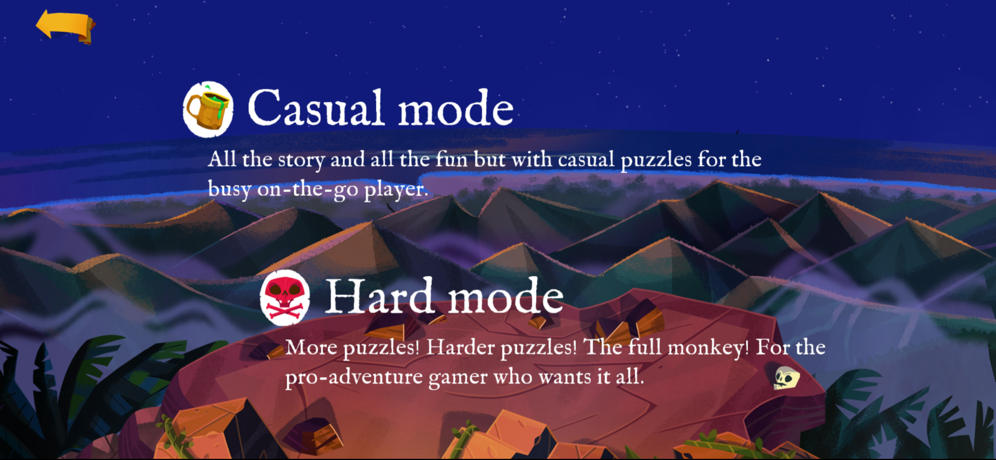
    I am looking forward to playing this game, and if you missed it, I would recommend it, for people who like old Lukas Arts quests: Full Throttle and others. I have great memories of completing the remastered version of Monkey Island 2 on my original iPad. When I wanted to start playing and deep dive into the world of pirates and silly adventures I was presented with the choice.

    monkey island on apple arcase presenting 2 difficulty modes: casual and hard

    There’s one aspect of modern gaming which doesn’t sit right with me—it’s difficult choices. I mean I don’t like to choose difficulty in general, because I always self-doubt my choice. It’s my personality I guess. And video games is an escape. A world where I can’t make the wrong choice. Unless making wrong choices is part of the game.1

    This screen is terrible because there’s not even a medium option. I see this design as a delegation of UX to the player. Now in a way, you designed two games, and you want me to be responsible for making a choice which one I want. The problem is, and a truth, at least for me. I do not know. Honestly, I do not know what’s best for me here. I just want to play the game, enjoy a story, and be challenged with puzzles. If you are a game designer, I want you to take more responsibility and reduce these choices for your customers, or at least hide, or bury them in the settings— default experience matters. Your choices matter. If the game feels too hard or not too challenging enough at least I can blame you, and not blame myself for picking a wrong option. From my experience, in most of the cases, no matter what difficulty I pick, I end up restarting the game. Or constantly switching between options during gameplay, which is even worse. It takes me out of flow, now I am thinking as a game designer instead of enjoying the process.


    1. From my experience. Divinity Original Sin 2 often presents dialogue options and situations which lead to creating more problems for your characters. As well as moral dilemmas where you end up negatively affecting one or another party. ↩︎

    → 5:53 PM, Aug 30
  • Calendar notifications

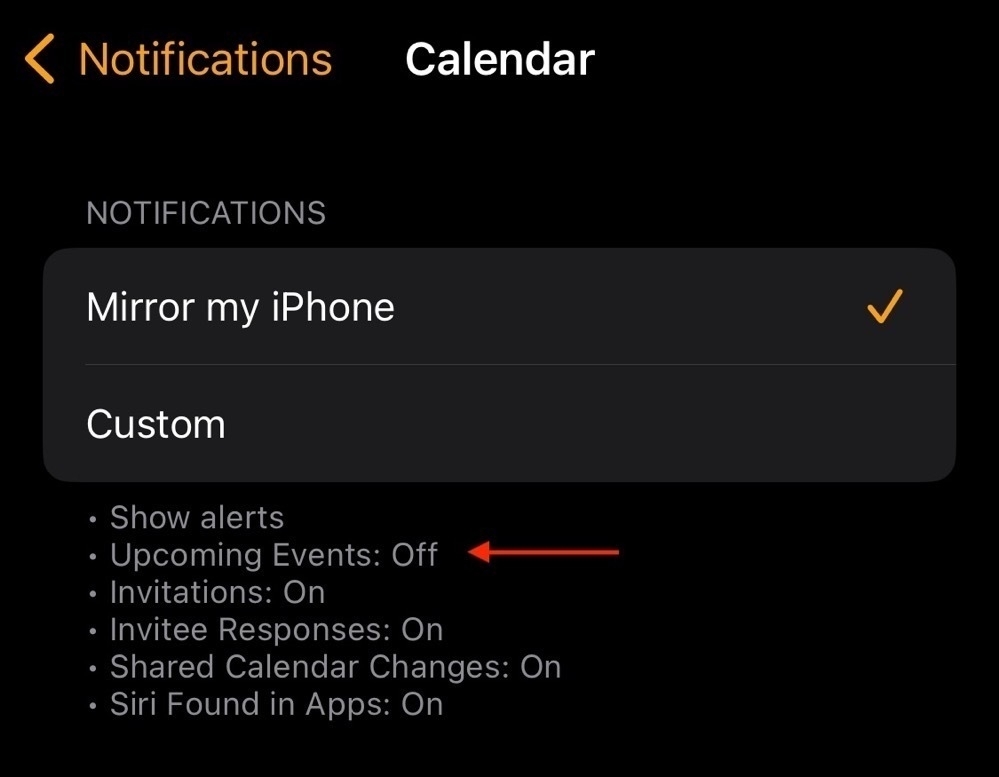
    Lately, I started to notice that I miss more meetings than usual. I don’t think I was getting notified for any events, including those which have multiple alerts. The problem is, somehow, my Apple Watch Calendar settings show “Upcoming events: Off”.

    upcoming events set to off in

    That’s the first problem, but there’s more. Calendar events created on the Apple Watch itself do not contain default alerts. I double-checked Settings → Calendar → Default Alert Times in iOS. I do have default alerts set for all my events. These settings don’t sync with Apple Watch. At least, not in watchOS 10. Here’s a related Apple forum about events created with Siri.

    After we described these two problems, we can be sure we will never miss an event, right? Wrong. There are things I needed to do to improve the notification situation. I already miss the early days of iOS when we had less features, but it also meant fewer settings to mange.

    My devices must always notify me about every event. When I am listening to music or podcasts, I want the audio to be interrupted with Siri announcing calendar events.

    Go to Settings → Notifications → Calendar.

    1. Make sure you have notifications enabled in the presentation style you want.
    2. Set NOTIFICATIONS DELIVERY to “Immediate Delivery”.
    3. Enable and change Announce Notifications to “All Notifications”.
    → 5:08 PM, Aug 27
  • Testing CloudKit

    I am working on an app update for Pinbook which will bring iCloud sync between iPhone and Apple Watch. I never used CloudKit and CKSyncEngine in the past. After I finished refactoring my app to allow sync I had a problem running unit tests. Here’s what I learned.

    1. The Simulator needs to be signed in to the iCloud account. I used a separate Apple ID which I use on all my test devices. Some say you also need to be logged in to iCloud.com with Safari on the Mac.
    2. The test target needs to have a Host Application selected.
    3. Finally, if you experience test stalling, try running on a different simulator.

    The last one really got me and I spent way too much time looking in other places when simply choosing a different simulator fixed my issue. I had some test code which cleaned the iCloud container before the test starts. This test code never stopped running stalling the test.

    override func setUp() async throws {
        try await super.setUp()
    
        // Clear out the server data before every test.
        // This makes sure each test starts out with a clean database.
        //
        // Note that this is potentially dangerous if you're running tests for an app with real precious data in it.
        // When building your own tests, you might want something slightly smarter.
        // For example, your tests might save data to a special test zone, or even a completely separate test container.
        print("test setup start")
        let zoneID = CKRecordZone.ID(zoneName: Pin.zoneName)
        try await PinbookDataStore.container.privateCloudDatabase.deleteRecordZone(withID: zoneID)
        print("test setup end")
    }
    

    When I ran my test I saw “test setup start” but didn’t see “test setup end”. Only choosing a new simulator fixed the problem.

    Code taken from Apple sample project.

    → 11:09 AM, Aug 25
  • Does my app use encryption?

    A note for myself as I keep researching this topic every couple of years. If your app uses CloudKit encryption, it does not count as something you need to declare in the App Store Connect.

    Your app uses encryption limited to that within the Apple operating system

    No documentation is required in App Store Connect.

    – Apple
    – Stack Overflow confirmation

    App Store Connect questions

    Does your app implement any encryption algorithms that are proprietary or not accepted as standards by international standard bodies (IEEE, IETF, ITU, etc.)?

    Does your app implement any standard encryption algorithms instead of, or in addition to, using or accessing the encryption within Apple’s operating system?

    You can avoid all these questions by modifying the Info.plist file.

    <key>ITSAppUsesNonExemptEncryption</key>
    <false/>
    

    As my current understanding, the false value means you answering no to both questions.

    HTTPS

    From Stack Overflow, the US government changed the law and eased rules on mobile apps which use HTTPS. If your app uses HTTPS, you still should answer no to the both questions.

    → 7:55 PM, Aug 24
← Newer Posts Page 13 of 37 Older Posts →
  • RSS
  • JSON Feed