Cocoa Switch
CV Archive Photos Also on Micro.blog
  • It’s wonderful to see that we will be able to run frontier models on our desks at home, with the privacy and energy efficiency we deserve. The future comes knocking, sooner than I expected. More power to the rest of us. www.macstories.net/news/meta…

    → 9:17 PM, Oct 15
  • Career update

    In August I decided to leave Compare the Market and had a much needed break with my family in Bulgaria. During my holiday Louis Gush called me with an offer from Global, where I have been working since September.

    Global’s mission is to make everyone’s day brighter. It’s a noble goal. Other companies have a long list of values; Global is just about making people smile. Making someone else’s day a bit better is something I truly care about. Since day one I have felt a culture of self-respect, creative rigour, and pride in the amazing work we are doing here. It’s a creative company, on top of all. It’s about music. Since my childhood music was the most important part of my personal life. It was a hobby, it was a way for me to connect with the world and people around me. I can’t be happier making radio shows, music and podcasts accessible to millions of people in the UK.

    People here are incredibly fun and diverse. We are sharing opinions openly, and everything we do serves this mission, building something really positive, while having fun on the journey. I am grateful to Louis, Ádám, Arda, Tina, Kassim, and Karl, Kevin, Alan, as well as the rest, for providing me with everything I need and sharing ambitious plans with me. We will make something big and great a reality. I am super excited and can’t wait to share what we are going to ship soon.

    Me standing in front of elevators with global logo behind

    Stay tuned for more updates.

    X https://x.com/jurkevyc
    BlueSky https://bsky.app/profile/jurkevyc.bsky.social
    Mastodon https://mastodon.social/@jurkevyc
    Threads https://www.threads.com/@jurkevyc.foo
    RSS https://www.cocoaswitch.com

    Until the next time.
    -Boris
    → 7:38 PM, Oct 15
  • Disable Siri AI hijacking Mac OS UI

    Update

    After running these second command I lost access to Writing Tools from contextual menu. It didn’t happen straight after restart, but it did happen. So I can’t recommend this solution now.

    Original post

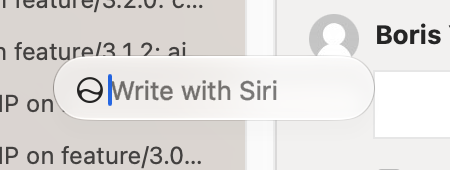
    There are two issues with Golden Gate: Siri AI floating bubble, and context menu hijacking. I do use Siri AI on Mac, but I don’t want additional GUI clutter.

    To fix the context menu, I ran this command.

    codes=(soft apwn exit loca lock logo rlgo rcnt rrst rest rsdn shut slep spro syss)
    args=(-int 0)
    
    for code in $codes; do
      hex=$(printf %s "$code" | xxd -p -u)
      args+=(-int "$((16#$hex))")
    done
    
    defaults write -g NSAppleMenuAllowedItems -array "${args[@]}"
    

    And to re-enable:

    defaults delete -g NSAppleMenuAllowedItems
    

    The floating button is even more annoying and doesn’t always align with text field entry in some apps, like, SourceTree.

    Siri AI floating bubble

    Get rid of this distraction:

    sudo mkdir -p /Library/Preferences/FeatureFlags/Domain
    

    Following this command:

    sudo defaults write /Library/Preferences/FeatureFlags/Domain/WritingTools LightweightUI_macOS -dict Enabled -bool false
    

    I didn’t need to enter the password again.

    To restore:

    sudo defaults delete /Library/Preferences/FeatureFlags/Domain/WritingTools LightweightUI_macOS
    

    Both solutions require a restart. Tested on 27.0.1 (26A434), both worked for me.

    Information taken from MacRumors forum, and @itspdfu (X).

    → 6:33 AM, Oct 15
  • Xcode 27 and Claude Code skills

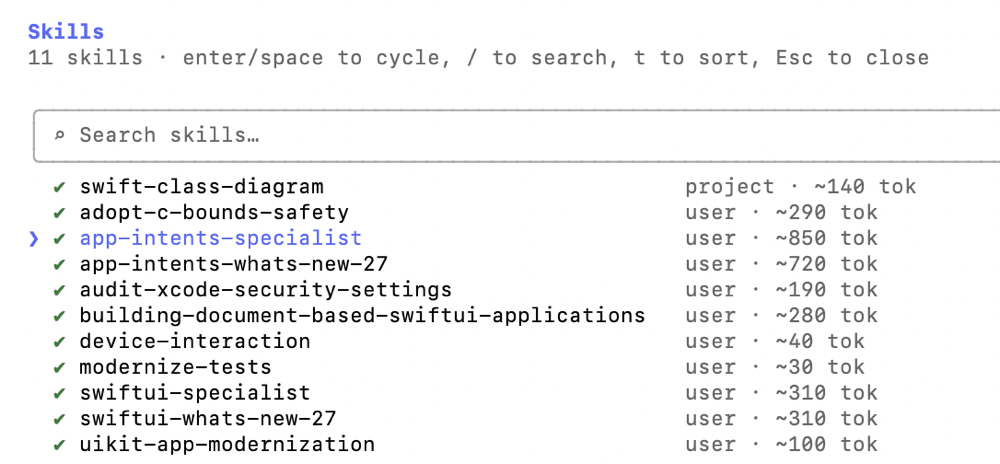
    If you prefer using Claude Code through the command line still, you can get all Xcode 27 skills by running this command:

    xcrun agent skills export --output-dir ~/.claude/skills
    

    You need to have Xcode 27 installed (1), and selected as default (2). If you don’t do the second step, you will see this error:

    xcrun: error: unable to find utility "agent", not a developer tool or in PATH
    

    This output you should see

    Launching Xcode...
    Exported 10 skills to ~/.claude/skills
      ✓ device-interaction
      ✓ adopt-c-bounds-safety
      ✓ swiftui-specialist
      ✓ app-intents-specialist
      ✓ modernize-tests
      ✓ uikit-app-modernization
      ✓ swiftui-whats-new-27
      ✓ audit-xcode-security-settings
      ✓ building-document-based-swiftui-applications
      ✓ app-intents-whats-new-27
    

    Verify the installation with the /skills command.

    All done. ✅

    → 6:20 AM, Oct 6
  • Untitled

    I am shocked by brutal lay-offs at one of my favourite publications. I’ve been listening to NVC and Beyond for a long time. More and more I am convinced that we as creative people cannot depend on anyone; to survive we have to go independent.

    kotaku.com/sources-i…

    overcast.fm/+ABE99WMr…

    → 7:04 AM, Oct 5
  • I was flying away from Bangkok today and noticed a green spot of grass. I love this shot so much; I had to be quick because the plane was taking off fast. This picture reminds me of SimCity 3000, with the same rich details and isometric perspective.

    Captured with iPhone 17 Pro Telephoto Camera

    I was flying away from Bangkok today and noticed a green spot of grass. I love this shot so much; I had to be quick because t
    → 7:38 PM, Oct 3
  • Bangkok, Thailand (2026). Photo taken with the iPhone 17 Pro, using Halide Mark III

    <p>Bangkok, Thailand (2026). Photo taken with the iPhone 17 Pro, using <a href="[halide.cam/"](https://halide.cam/")>Halide Mark III</a></p>
    → 2:43 PM, Sep 29
  • Currency payment options

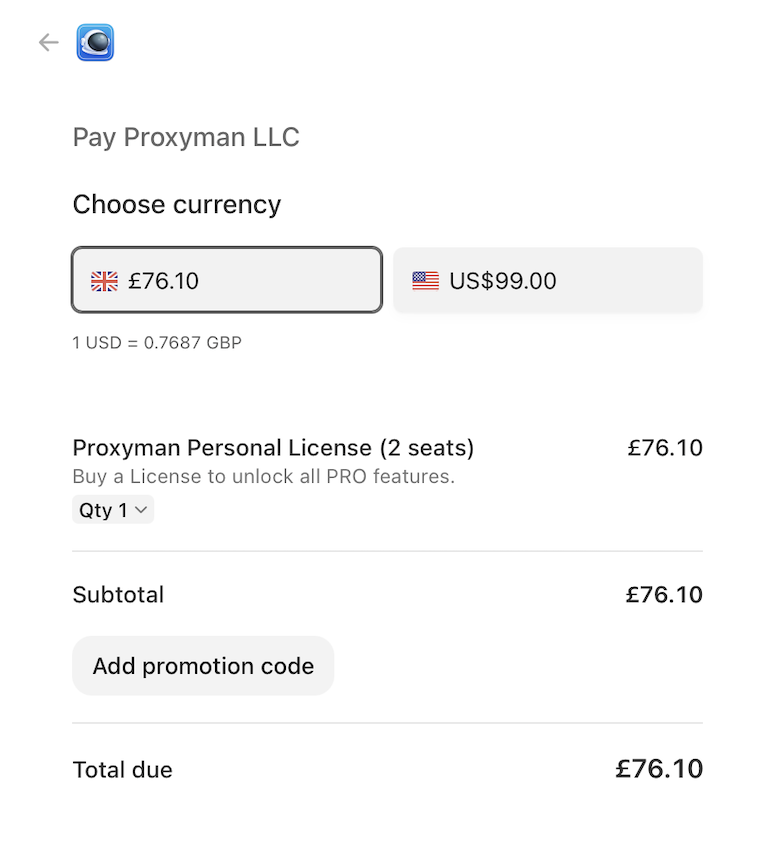
    In the later days, I found myself relying on Proxyman often. I am a Charles user and I have an outdated licence, but this time I decided to try Proxyman. I find the Proxyman’s Mac interface to be much better than Charles, and configuration easier. I decided to make a purchase and their online store page presented me with a choice between USD and GBP. GBP is selected by default.

    online store page with choices between 2 currencies GBP and USD

    I paid with USD, was charged £73.45. That’s a £2.65 win for me. I can’t promise your bank is the same, but do take note of the amount charged; it is likely that your bank has a more favourable rate.

    I think it’s true for many things: when travelling outside the U.K. and using a U.K. bank, it is likely better to pay in a local currency. For example, when in France, and a payment terminal gives you an option to pay in GBP, always dismiss it. Some merchants give you control of the terminal, but some ask. And some will make this choice for you, unfortunately.

    → 5:28 PM, Sep 18
  • Photo taken with the iPhone Air, using [Halide Mark III](https://halide.cam/)

    Photo taken with the iPhone 17 Pro, using Halide Mark III

    → 7:26 PM, Sep 10
  • GOG GALAXY drops support for Intel Macs

    GOG GALAXY 2.1 now supports Apple Silicon natively and doesn’t run on Intel anymore, raising the dependency target to Sonoma. Sadly, I noticed that the app now takes twice the disk space. What happened? SSD price is not cheap; I wish management gave some priority to optimising for disk space.

    No issues running on Golden Gate. I had to delete the old version before I could update to 2.1. I am happy it’s a modern build now and will be supported on macOS 28. Although a major GOG GALAXY appeal is game preservation, it doesn’t mean it needs to preserve itself and run on obsolete macOS versions. I am quite happy with this update; despite the increase in disk space, it’s still a step in the right direction.

    → 5:09 PM, Aug 30
← Newer Posts Page 3 of 37 Older Posts →
  • RSS
  • JSON Feed